Operational Principles
Chapter 4: IoTM Portal Interface Operational Principles
IoTM’s Bring-Your-Own-Telco, federated, connectivity and eSIM subscription lifecycle management is one of the main building blocks of its offering. Designed for large scale multi-carrier deployments, it allows customers to perform the common day-to-day actions required to manage an IoT SIM deployment, such as: SIM inventory management, SIM Life cycle management (e.g., Activation/Deactivation), eSIM lifecycle management (e.g., manual/batched MNO swaps), SIM Troubleshooting, SIM population tagging, Batch campaign management, Advanced SIM searching and listing, monitoring data, SMS, and voice usage, assigning a rate plan to a SIM. In IoTM terminology, a SIM, eSIM profile or CDMA subscription are all referred to as a “connection”.
Mixed connection deployments based on different connectivity providers and CMP (Connectivity Management Platform) can be onboarded and orchestrated seamlessly through IoTM’s single pane of glass Federated Connectivity Management Portal and APIs that provide common subscription management capabilities and flows and a harmonized user experience, normalized across the various connectivity management platforms and connectivity providers.
IoTM Connectivity Management Portal module main view offers 4 different functional tabs:
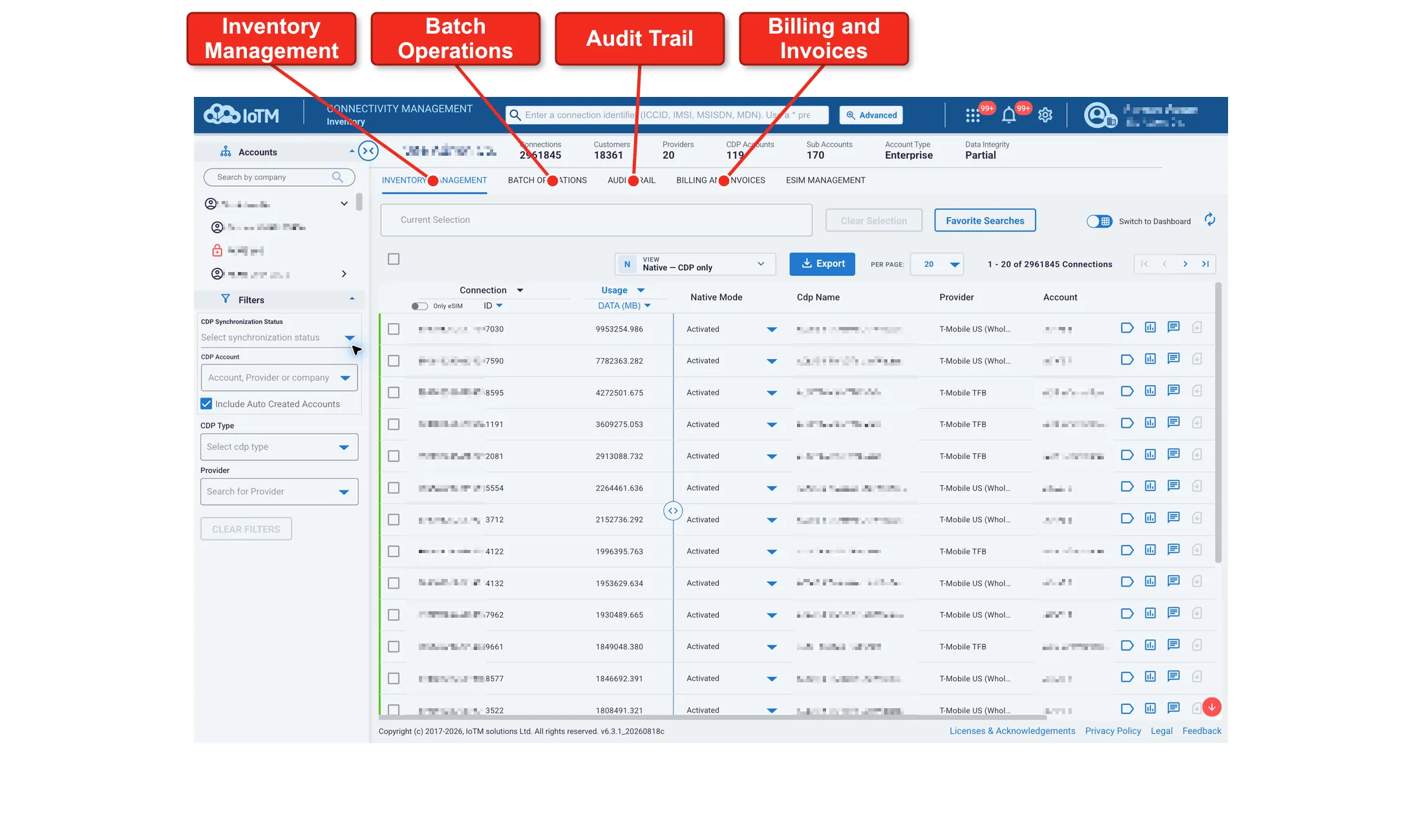
[REVIEW: The new screenshot includes a fifth eSIM Management tab; the original four-tab description is retained.]
IoTM Connectivity Management Portal Functional Tabs Summary
Tab | Description |
|---|---|
INVENTORY MANAGEMENT | Enable users to perform necessary day-to-day activities required to manage the connectivity and eSIM subscription life-cycle. On both single and large-scale batches. It offers both a grid view and a graph summarized dashboard view related to the population selection made by the user. |
BATCH OPERATIONS | Provides a graphical user interface for IoTM’s asynchronous batch operations campaign manager, designed to perform large-scale batch operations. These batch operations can originate either by file upload or by connection population selection from the inventory management view. It enables users to track progress, view, create, and manage batch activities and their associated jobs. In addition, the system sends notifications, and stores a detailed and downloadable completion report of all actions, providing a fully managed, secure and auditable experience. |
AUDIT TRAIL | The IoTM Portal audit trail tab gives an account administrator role users all the information related to what system events had occurred and which user triggered each request, the request details, originating IP address and result. |
BILLING AND INVOICING | The BILLING AND INVOICING tab shows connectivity service provider invoices as received from your mobile carriers providers’ CMP accounts. Note that some CDP account types do not support invoice synchronization. When available, it is possible to receive a high-level view of the CSP invoice or drill into an invoice item. |
9. IoTM Portal Interface Principles
The IoTM Portal has three basic types of pages: grid, dashboard and detail. This section outlines the core principles of using the IoTM Portal interface and how to use it to manage connectivity and eSIM subscriptions’ life-cycles.